
Auto mode blocking your push to the company GitLab? Teach it your infrastructure in 5 minutes with /auto-mode-setup
TL;DR
What it is:
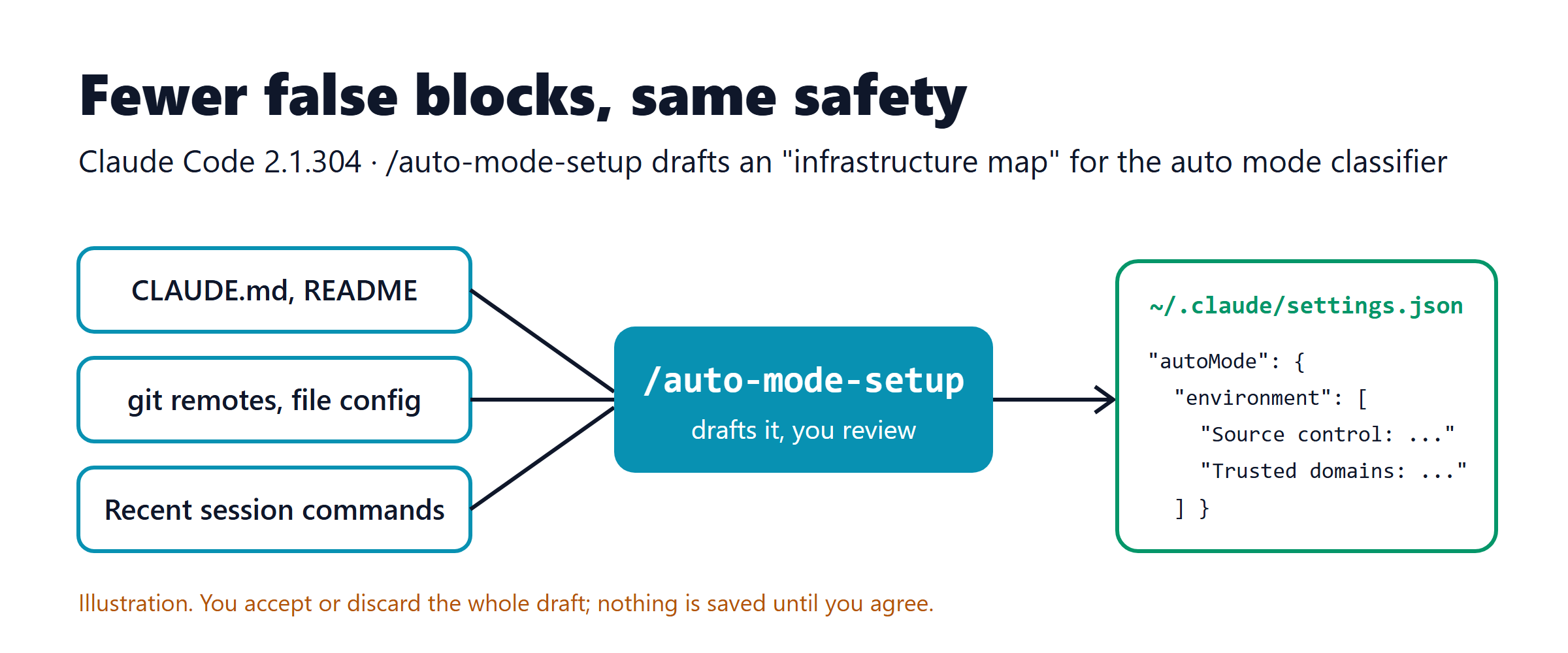
/auto-mode-setupis a built-in Claude Code command. It reads your project and your recent sessions and drafts anautoMode.environmentlist: the repos, domains, buckets and internal services that the auto mode classifier should treat as "ours". Version 2.1.304 (released on the evening of October 19, UTC) opens the command to Amazon Bedrock, Google Vertex (Agent Platform), Microsoft Foundry, the Claude apps gateway, and sessions with telemetry turned off.Key benefit: auto mode blocks fewer everyday actions by mistake, such as pushing to another repo in the company org, installing packages from an internal registry, or calling a staging API. The protection rules (production, data exfiltration, force push...) stay in place.
Time to try: about 5 minutes, in 3 steps:
claude update, type/auto-mode-setupin your project, then check withclaude auto-mode config.
Sound familiar?
You give Claude Code a tidy task: "fix the bug in the billing-api service, run the tests, then open a merge request in the shared-contracts repo to update the schema". You go make coffee, expecting it to be done when you come back.
When you come back, you see bash denied by auto mode · [Data Exfiltration]. The classifier doesn't know that gitlab.company.internal/platform/shared-contracts is a company repo. To it, that's just an unknown server "outside". Claude tries another way and gets blocked again. After 3 blocks in a row, auto mode pauses and goes back to asking you about every command.
Auto mode is actually doing its job: by default it only trusts the working directory and the configured remotes of the current repo. Everything else counts as external until you declare it. The problem is that few people sit down and write that list by hand. Starting today, you don't have to: /auto-mode-setup drafts it for you, and you just review it and accept.
What it is and how it works
Quick recap: auto mode
Auto mode is one of Claude Code's permission modes. Instead of you clicking "Yes" for every command, a second model, called the classifier, reviews each action before it runs. It blocks anything that goes beyond what you asked for, targets infrastructure it doesn't recognize, or looks like it is being steered by malicious content Claude just read (prompt injection).
Since version 2.1.283, auto mode is the default startup mode for interactive terminal and VS Code sessions, on every plan and every provider, as long as the model is supported and your organization hasn't turned it off. So there's a good chance you are already using auto mode without noticing.
How the classifier decides
Think of the classifier as a new security guard. He is very careful but doesn't know anyone in the company yet, so he stops everyone he doesn't recognize. To make him stop fewer people by mistake, you hand him a list: these are the company's buildings, this is the warehouse, these are trusted partners. That list is autoMode.environment.
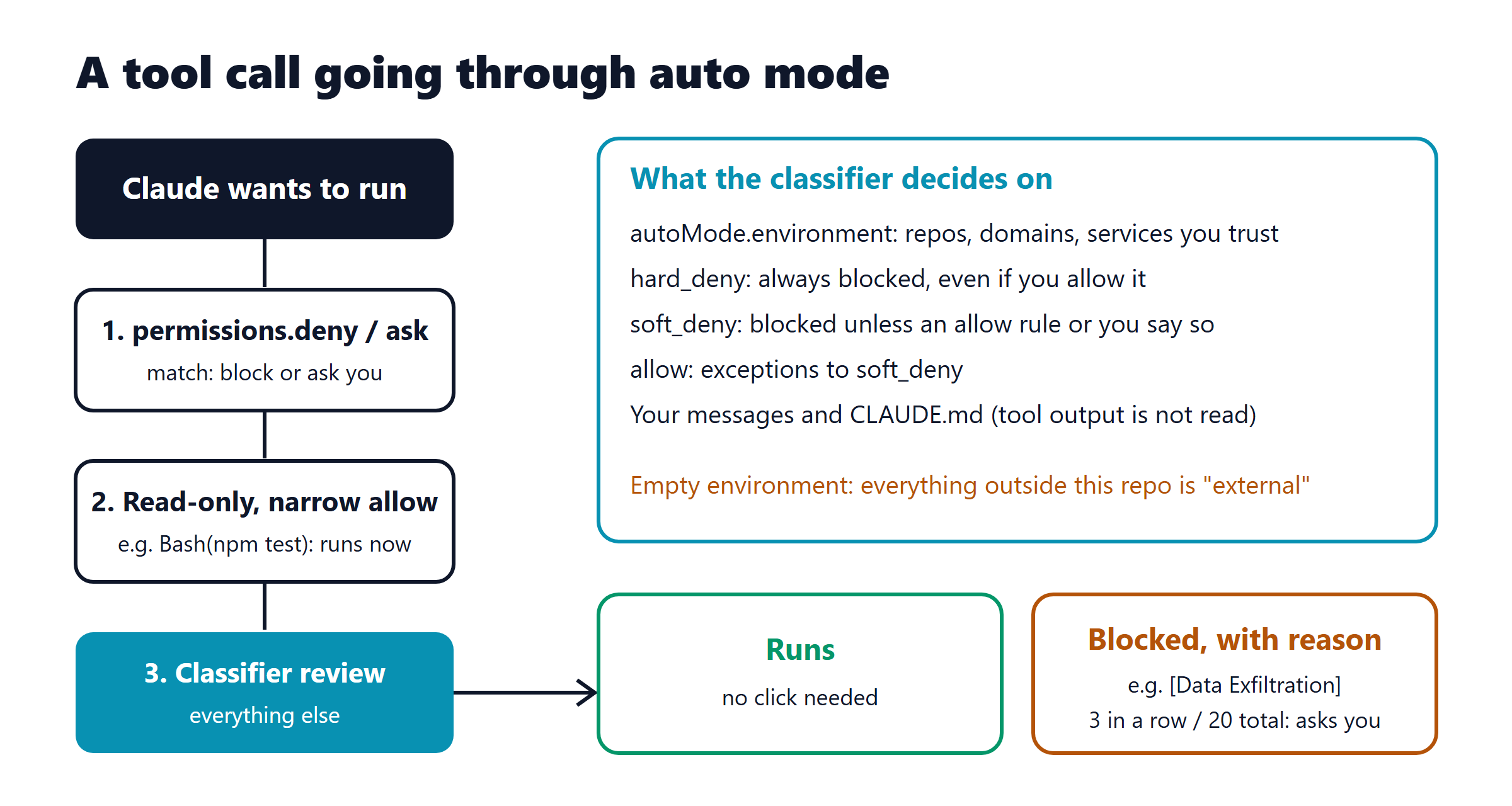
According to the official docs, a tool call goes through these layers:
permissions.denyandpermissions.askare checked first. A deny match blocks the action outright; an ask match asks you, even in auto mode.Read-only actions and narrow allow rules such as
Bash(npm test)run directly. Broad rules likeBash(*)are suspended while auto mode is on.Everything else goes to the classifier. The classifier reads your messages, the tool calls and CLAUDE.md, but not the tool output. So malicious content in a file or web page can't "talk" to the classifier directly.
Inside the classifier there are 4 priority levels:
Level | Meaning | Can you override it? |
|---|---|---|
| Absolute security boundary | No, not even if you say "just do it" |
| Destructive or risky actions | Yes, with |
| Exceptions to | — |
Your intent | You describe that exact action | Only lifts |
I ran claude auto-mode defaults on version 2.1.304 and counted 17 allow rules, 72 soft_deny rules, 1 hard_deny rule (Data Exfiltration) and 21 environment entries. Most environment entries are "None configured", which means they are waiting for you to fill them in.
What /auto-mode-setup does
The command drafts autoMode.environment entries, sometimes with allow/soft_deny rules too, from your own project. According to the docs, it always reads:
your project's
CLAUDE.md,README.md, config files and git remotes;your existing
autoModeandpermissions.allowsettings;hosts, buckets and command names from the commands Claude ran in recent sessions in this project. It does not read your messages.
It also asks before running two optional scans: the first word of each command in your shell history, and the remote hosts and names of the repos in your home folder. You can decline both.
When the scan is done, Claude Code shows you the draft. You accept or discard the whole draft. If you accept, it writes to ~/.claude/settings.json (your personal file, not in the repo) and offers to remove permissions.allow entries that auto mode ignores, such as Bash(*).
Try it in 5 minutes
Prerequisites:
Claude Code 2.1.304 or later. On Pro, Max and Team plans the command has existed since 2.1.228 (2.1.233 on native Windows), but update anyway to get the latest fixes.
Signed in with a Pro, Max or Team plan, or, since 2.1.304, through Bedrock, Vertex (Agent Platform), Foundry or the Claude apps gateway.
Auto mode available: a supported model (on Bedrock/Vertex/Foundry you need Sonnet 5 or later, Opus 4.7 or later, Haiku 5.5 or Fable) and your organization hasn't set
disableAutoMode.Run it in a real project where you have used Claude Code for a few sessions, so the command has data to read. It does not work in cloud sessions.
Step 1: update Claude Code
claude update
claude --version
# 2.1.304 (Claude Code)
The commands are the same on PowerShell and macOS/Linux.
Step 2: run /auto-mode-setup in your project
cd path/to/your-project
claude
In the Claude Code session, type:
/auto-mode-setupClaude Code will:
ask whether to add to or replace your current list, if
~/.claude/settings.jsonalready hasautoMode. Rules you wrote yourself are kept either way;ask what you use this project for;
ask whether to run the two optional scans. For a first run, I suggest only the home-folder repo scan if you often work across several repos in the same org;
scan in the background, then show the draft for you to review.
Tip: read every line of the draft. If you see a personal domain or a bucket you shouldn't trust, accept the draft and then delete that line from
~/.claude/settings.json, or open/permissionsand use the Auto mode tab to edit it.
Step 3: check the effective configuration
claude auto-mode configThis prints JSON with the 4 lists allow, soft_deny, hard_deny and environment: your settings where you set them, and the defaults everywhere else. If you wrote extra rules yourself, also run:
claude auto-mode critiqueThis asks AI to review your rules and flag anything vague, duplicated, or likely to block things by mistake.
What you will see: the environment section of claude auto-mode config now has plain-language lines, for example (illustration, the domains are made up):
"environment": [
  "Organization: AXC team. Primary use: web and backend software development",
  "Source control: gitlab.company.internal/platform and all repos under it",
  "Internal package registry: nexus.company.internal (npm and Maven)",
  "Trusted internal domains: *.staging.company.internal",
  "..."
]
The next time Claude pushes to a repo in the same org or runs npm install through the internal registry, the classifier knows it's "ours".
Before and after
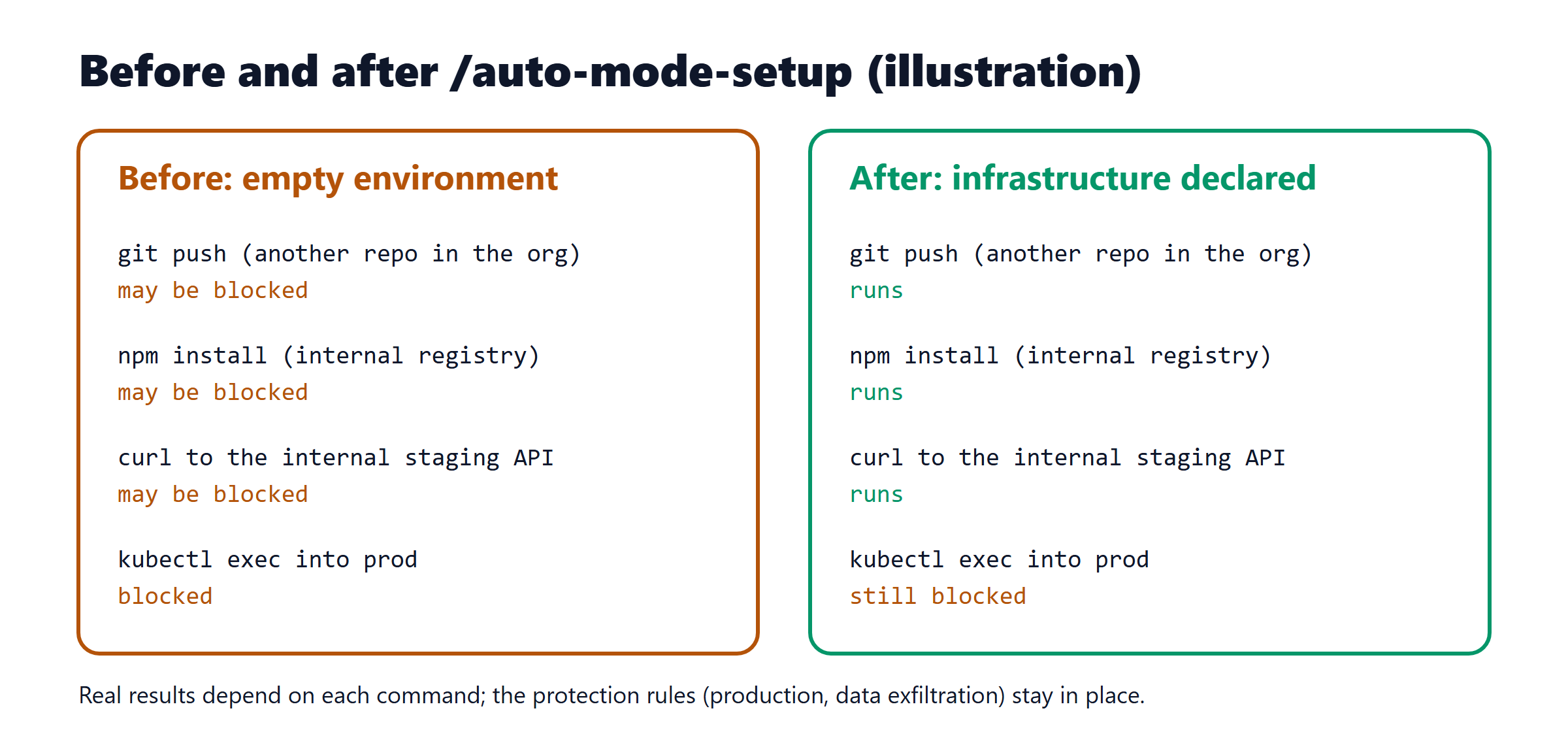
Before (empty environment) | After ( | |
|---|---|---|
What the classifier trusts | The working directory and the current repo's remotes | Plus the org's source control, registries, domains and buckets you approved |
Writing the config | Read the docs and write plain-language JSON yourself, about 30–60 minutes (estimate) | Answer a few questions and review the draft, about 5 minutes (estimate) |
When something is blocked by mistake | Approve each command; after 3 in a row auto mode pauses | Fewer false blocks for declared infrastructure |
Protection rules | Complete | Still complete. The draft adds |
Risk | Frustration leads people to switch to | You keep auto mode instead of turning off all checks |
The last row is the most important reason. When auto mode blocks too much by mistake, people tend to switch to --dangerously-skip-permissions, and the docs say clearly that this mode has no protection at all against prompt injection. A correct environment configuration is how you stay safe without the friction.
Going deeper: 3 real-world scenarios
Scenario 1: microservices across several repos in one GitLab org
Situation: a feature touches order-service and shared-contracts. Claude needs to push branches and open MRs in both repos.
What to do: run /auto-mode-setup in order-service and allow the home-folder repo scan. The draft will include a line like Source control: gitlab.company.internal/platform and all repos under it.
What happens: pushing to shared-contracts is no longer treated as sending code outside. The push content is still checked: a force push or a commit that accidentally contains a secret is still blocked.
Why it's better: if you want to review each push yourself, you can still do that with permissions.ask:
{
  "permissions": {
    "ask": ["Bash(git push *)", "Bash(glab mr create *)"]
  }
}
Scenario 2: staging deploys allowed, production migrations forbidden
Situation: the team lets Claude deploy to the staging namespace (reset every night), but it must never run migrations outside the standard CLI.
What to do: after accepting the draft, add rules to ~/.claude/settings.json, and remember to keep "$defaults":
{
  "autoMode": {
    "allow": [
      "$defaults",
      "Deploying to the staging namespace is allowed: staging is isolated from production and resets nightly"
    ],
    "soft_deny": [
      "$defaults",
      "Never run database migrations outside the migrations CLI, even against dev databases"
    ]
  }
}
What happens: staging deploys run right away. Manual migrations are blocked with a reason. Run claude auto-mode critique to make sure the two rules don't conflict.
Why it's better: rules are written in plain language, the way you'd brief a new colleague. No regex, no pattern syntax to remember.
Scenario 3: a team lead standardizes it for the whole team
Situation: 10 people each running /auto-mode-setup on their own will end up with 10 different versions.
What to do: one person runs the command and picks out the shared entries (org, registries, internal domains), then an admin puts them into the organization's managed settings. Personal entries are left for each person to add.
What happens: according to the docs, entries from different scopes are combined. Developers can add their own entries but can't remove the ones managed settings provide.
Why it's better: everyone who joins the team gets a standard "infrastructure map" from day one. One important caveat: a personal allow can still override an organization soft_deny. For things that must never happen, use permissions.deny in managed settings.
Pro tips
Read the block reason, then fix the right thing. The text in square brackets, such as
[Production Deploy], is the name of the rule that matched. See the full rule withclaude auto-mode defaults --label 'Production Deploy'.Retry in seconds. Open
/permissions, go to the Recently denied tab, and pressron the action that was blocked by mistake. When you close the dialog, Claude is told it can try again.Destinations used throughout a task go in
environment, repeated commands go inallow, one-off actions just go in your message. This is the split the docs suggest.Don't put
autoModein the repo's.claude/settings.json. The classifier deliberately ignores it there, so an unknown repo can't "grant itself" permissions. Keep it in~/.claude/settings.json.To review every shell command, turn on
"classifyAllShell": true. Then even narrow allow rules go through the classifier. It is a little slower in return.Log every block with a
PermissionDeniedhook. The hook receives the fulltool_input, which is handy for seeing where your team gets blocked by mistake most often.Boundaries you state in the conversation can be lost after compaction. "Don't push" only works while that message is still in context. If it must hold, write a deny/ask rule.
If the config gets messy, run
claude auto-mode reset. It removes theautoModesection from your personal settings and asks for confirmation before writing.
Caveats and limits
Plans and environments: the docs say
/auto-mode-setupneeds Pro, Max or Team. The 2.1.304 changelog adds Bedrock, Vertex, Foundry, the Claude apps gateway and sessions with telemetry off. The changelog does not mention Enterprise plans signed in directly, so check on your own machine. The command does not run in cloud sessions.The draft can be wrong. It infers from commands you ran and config files. A domain you once tried with
curlisn't necessarily one you should trust. Review carefully before saving.Privacy: the two optional scans read your shell history and the repos in your home folder. If your machine has customer repos or personal repos, think before turning them on.
Cost: on Enterprise, API, Bedrock, Vertex and Foundry, classifier calls count toward your tokens. Auto mode adds one extra request before each command it reviews, mostly shell and network commands.
Dropping
"$defaults"drops the rules. If you write your ownsoft_denywithout"$defaults", you remove all the built-in soft block rules, including force push,curl | bashand production deploys.Auto mode is not a guarantee of safety. The docs say so themselves. Sensitive work (production databases, financial infrastructure) should still run in Manual mode or in an isolated container.
Don't want the prompt? After a few blocks with no environment configured, Claude Code shows a "Teach auto mode about your environment?" dialog. Choose Don't show again, or turn it off completely with
"skillOverrides": { "auto-mode-setup": "off" }.
Claude Quick Hits
Claude Code 2.1.304, other changes: the new
/claude-api managed-agents-securecommand compares a Managed Agents agent's configuration with Anthropic's published security guide, and changes nothing. Pro/Max plans now warn you when resuming an old conversation will use a large share of your 5-hour limit. This release also fixesclaude --worktreedeleting a worktree and branch without asking when HEAD was detached, which could lose commits. How to try:claude update, then type/claude-api managed-agents-securein a project that uses Managed Agents.Anthropic replaces git for its monorepo (October 19): the engineering post "Redesigning source control" describes Scion, an internal version control system built by 7 people in 5 months. According to Anthropic: main-branch history of nearly 100 GB, about 25 million CI checkouts per day, merges growing from about 2,500 per day (May) to more than 30,000 per day (September), and about 200 times fewer infrastructure resources than the old git mirror cluster. Scion is not open source. How to try: read the cache design section if your team suffers from slow CI checkouts. Original post.
AI Tool Radar
Repo/Tool | What it does (1 line) | Stars (growth) | License | Effort to try |
|---|---|---|---|---|
Compresses tool output, logs and files before they reach the LLM | 76,273 (+310 today) | Apache-2.0 | Easy | |
A skill that makes the agent answer with an HTML page with diagrams | 3,924 (created Oct 2) | MIT | Easy | |
Monitor coding agents and approve permissions from the notch/top bar | 5,593 (created Sep 27) | MIT (except name and characters) | Medium | |
"Ears" for coding agents: listen to, review and make sound | 1,557 (created Oct 15) | MIT | Medium | |
New Flash model for agents and coding | 385 HN points | Weights not released yet | Easy (via API) |
headroomlabs-ai/headroom
Why it's hot: on GitHub Trending today (+310 stars). It tackles context that fills up with logs and tool output.
Best for: anyone who runs long Claude Code sessions with test logs, Playwright, or data dumps.
Quick try:
uv tool install --python 3.13 "headroom-ai[all]", thenheadroom wrap claude. Undo withheadroom unwrap claude.Watch out:
wrapruns a local proxy and registers an extra MCP server, Serena, in~/.claude.json. Read the README first to see what it changes. It's in the same category as context-mode, which I covered on October 19.
QingYunA/answer-me-with-html
Why it's hot: created on October 2 and already close to 4,000 stars. The agent writes a Markdown draft, and the bundled CLI handles layout and SVG.
Best for: technical explanations, technology comparisons, onboarding docs.
Quick try:
/plugin marketplace add QingYunA/answer-me-with-html, then/plugin install answer-me-with-html@answer-me-with-html(needs Node 20+).Watch out: "New / not yet stable". The CLI checks GitHub for updates every day. "Always-on mode" writes rules into your global
~/.claude/CLAUDE.md, so only turn it on if you really want that.
Louis-CFM/coucou
Why it's hot: 5,600 stars in 3 weeks. Approve permissions and answer agent questions right from the Mac notch or the top bar on Windows/Linux.
Best for: people who run several agents in parallel and often miss permission prompts.
Quick try: on Windows, use the MSI/EXE installer from Releases. On Mac, use the Homebrew cask. Then open Settings and choose Install hooks for Claude Code.
Watch out: "New / not yet stable". The Windows installer is not code-signed, so SmartScreen will warn you. Push notifications to iPhone go through the author's Cloudflare relay.
Leonxlnx/earshot
Why it's hot: created on October 15, more than 1,500 stars. Lets an agent "listen" to audio files through a CLI, a Python API or an MCP server, running entirely on CPU.
Best for: teams building games, demo videos, or products with audio.
Quick try: install per the README (Python 3.10+, ffmpeg), then
claude mcp add earshot --scope user -- <venv-python> -m earshot mcp.Watch out: "New / not yet stable". The first run downloads about 1.1 GB of models (CLAP Apache-2.0, AST BSD-3).
MiniMax M3.1 Flash
Why it's hot: 385 points on Hacker News (October 19). According to MiniMax: 73.7% on DeepSWE v1.1, priced at 0.60 per million input/output tokens.
Best for: anyone who needs a cheap model for high-volume agent tasks.
Quick try: through the MiniMax API or the MiniMax Code app.
Watch out: weights "will be released later", and there is no license yet. Benchmark numbers are self-reported by the vendor.
Today's challenge
In 20 minutes: run /auto-mode-setup on the project where you use Claude Code the most, review the draft, then run claude auto-mode config.
Done when: the environment section has at least one Source control: line pointing to your team's org, and you have deleted every line you're not sure you should trust.
Bonus: take a screenshot of the claude auto-mode critique output (hide internal domains) and share it in the team channel. I'd like to collect the shared entries and propose one managed settings bundle for the whole team.
Further reading
Configure auto mode: the official docs for
autoMode,/auto-mode-setupand theclaude auto-modecommands.Choose a permission mode: what auto mode blocks by default, and when it goes back to asking you.
Claude Code auto mode (engineering deep dive): how the layers of protection work together.
Sources
https://github.com/anthropics/claude-code/blob/main/CHANGELOG.md
https://github.com/anthropics/claude-code/releases/tag/v2.1.304
https://www.anthropic.com/engineering/redesigning-source-control
Default rule counts: counted from
claude auto-mode defaultson Claude Code 2.1.304, October 20, 2026